
For UK players, the Fitzdares app offers a convenient way to access sports betting and selected casino-style entertainment from a mobile device. However, safe installation matters. Using the wrong website, an unofficial file, or an unsuitable payment page can expose your personal information and create avoidable security risks.
This guide explains how to find, download, and use the official application safely. It also covers device compatibility, account verification, responsible play, payment protection, and what to do if the app is unavailable through your preferred app store. The focus is the United Kingdom market, where licensed operators must follow strict rules on identity checks, advertising, and player protection.
What Is the Fitzdares App?
The Fitzdares mobile application is designed for customers who want quick access to their account, betting markets, promotions, and available gaming products. Depending on the current product range, users may be able to browse casino games, manage deposits and withdrawals, review account activity, and contact customer support without opening a desktop browser.
The mobile format is useful for players who prefer a smaller interface and faster access. Push notifications can also keep users informed about account messages or promotional campaigns. Nevertheless, the app should be downloaded only from an official source and used on a secure, up-to-date device.
FitzdaresApp UK Digital App
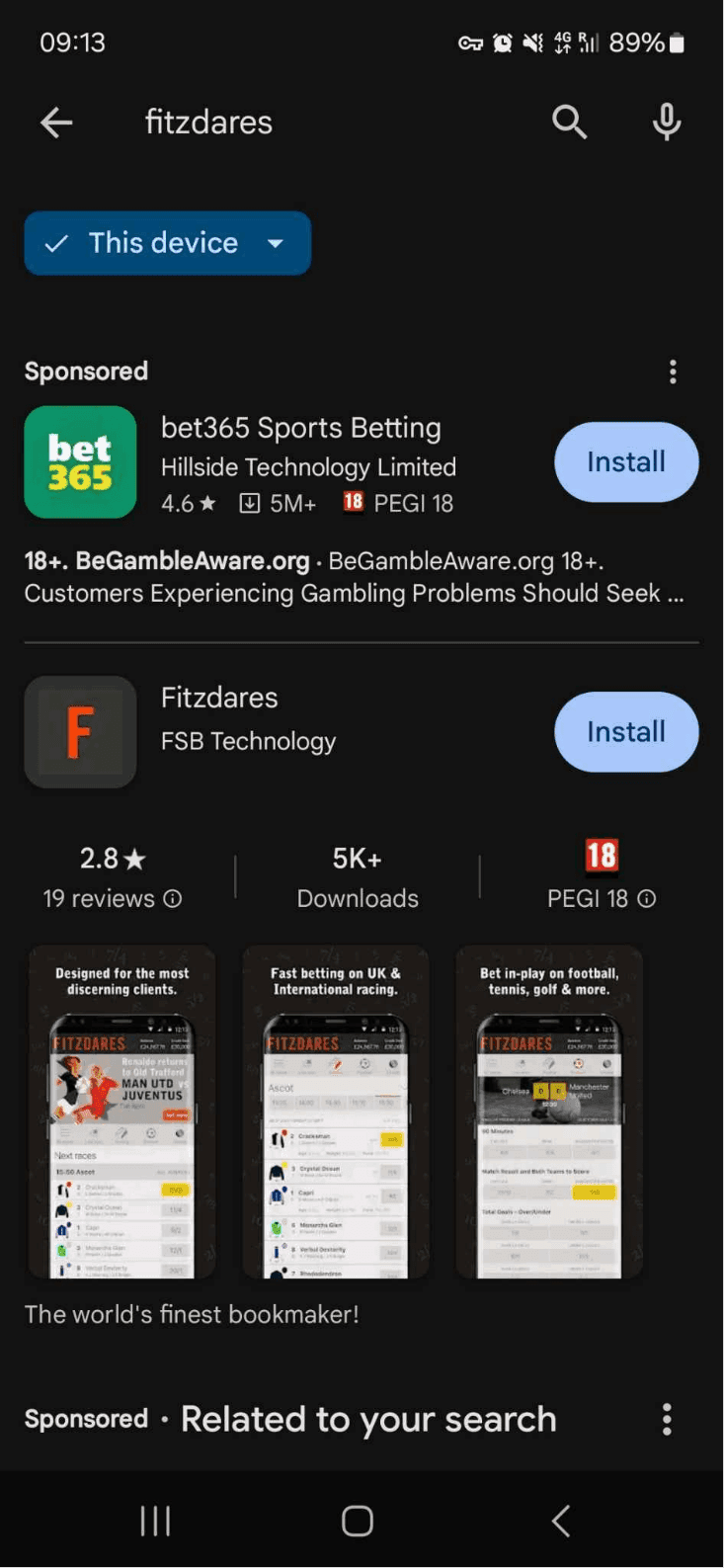
The phrase FitzdaresApp UK Digital App is useful when searching for information, but search results should be checked carefully. Fraudulent pages may copy branding, use similar domain names, or promise an instant installation package. The safest approach is to begin at the official Fitzdares website or a verified Apple App Store or Google Play listing, where available.
How to Download the App Safely
Start with the official website
Use a browser on your phone or tablet and type the official Fitzdares web address manually, rather than selecting an unknown advertisement. Check that the page uses HTTPS and that the domain spelling is correct. Look for links to the official mobile application, customer support, terms and conditions, and responsible gambling information.
Check the app-store publisher
On iOS or Android, confirm that the application is published by the genuine operator or its authorised technology provider. Read the description, developer information, update history, ratings, and privacy details. A legitimate listing should not request permissions that are unrelated to betting or account management.
Avoid unofficial installation files
Do not install an APK supplied by a forum, social-media account, pop-up advertisement, or file-sharing website. Android users may be asked to enable installation from unknown sources, but doing so can increase the risk of malware. If an official native app is not available, use the secure mobile website instead of downloading an unverified file.
Review the connection before logging in
After installation, open the app from your device menu rather than from a suspicious message link. Check the operator name, privacy policy, and login screen. Never enter your password or payment information if the page looks unusual, contains spelling mistakes, or redirects repeatedly.
Device and Account Preparation
Before downloading, update your phone’s operating system and install current security patches. Download applications through a trusted Wi-Fi or mobile-data connection, and keep screen-lock protection enabled. Avoid logging in on shared or public devices.
You will normally need to register an account or use an existing Fitzdares account. UK operators may request proof of identity, age, address, or payment ownership. These checks are standard regulatory procedures. Upload documents only through the secure account area, never by sending them to an unknown email address or messaging account.
Use a unique password that is not shared with other websites. If two-step verification is offered, activate it. Also check your account session after each visit and sign out if you are using someone else’s device.
Starting Casino Play on Mobile
How to start betting in casino
- Open the official app and sign in to your verified account.
- Choose the casino or gaming section available to UK customers.
- Read the game information, stake limits, and any applicable terms.
- Set a budget before depositing funds.
- Select a payment method shown inside the secure cashier.
- Begin with small stakes and stop when your planned limit is reached.
Casino games are based on chance, and no system can guarantee a profit. A result from a previous spin does not make a particular outcome more likely. Avoid chasing losses, increasing stakes because of frustration, or treating gambling as a way to pay bills.
Demo and game information
Where a demo mode is available, it can help you understand the interface, paylines, bonus features, and stake controls without risking real money. Demo play does not reproduce every aspect of a cash session, particularly the emotional effect of wins and losses, so it should be viewed as a familiarisation tool rather than a prediction of future results.
Before playing for money, inspect the game’s displayed rules. Look for the return-to-player percentage, volatility description, minimum and maximum stake, bonus-round conditions, and any restrictions connected with promotions. These details help you compare games realistically.
Payments and Security Checks
Use a payment method registered in your own name and follow the instructions displayed in the official cashier. Never share a card PIN, one-time banking code, or full security credentials with customer support. Genuine support agents should not ask for information that would allow them to access your bank account.
Deposits may be subject to minimum limits, verification, or affordability checks. Withdrawal processing can also require identity confirmation. Keep copies of transaction confirmations and review your bank statement regularly. If a payment appears that you do not recognise, contact your bank and the operator promptly.
Do not use public Wi-Fi for deposits or withdrawals. A home network with a current router password is preferable. Keeping the operating system, browser, and security software updated reduces exposure to known threats.
Questions and Answers
Is the Fitzdares app safe for UK players?
Safety depends on using the official application or website, maintaining secure account credentials, and following responsible gambling controls. Players should verify the operator’s current UK licensing information and read the latest terms before registering.
Can I download the app from any website?
No. Use the official Fitzdares website or a recognised app store. Avoid third-party APK websites and links sent through unsolicited messages.
What if I cannot find the application in my app store?
Availability can vary by device, operating-system version, and current distribution policy. Do not bypass regional controls with an unverified download. Visit the official website and use its mobile browser service or contact verified support for guidance.
Will I need to verify my identity?
Most UK gambling accounts require age and identity checks. Additional verification may be requested before withdrawals or when account details change.
Can I use the app outside the UK?
Access depends on local laws, account rules, and geolocation controls. Do not attempt to evade location checks with a VPN, as this may breach the operator’s terms and affect withdrawals.
Practical Strategies and Tips
- Set a daily, weekly, or monthly deposit limit before playing.
- Use reality checks or time reminders to monitor sessions.
- Keep gambling separate from essential household spending.
- Read bonus wagering requirements before accepting an offer.
- Do not borrow money to continue playing.
- Take a break if gambling stops feeling entertaining.
Many UK operators provide tools such as deposit limits, time-outs, account blocking, and self-exclusion. These tools are most effective when selected before a problem develops. Organisations such as GamCare and the National Gambling Helpline can provide confidential support to people affected by gambling-related harm.
Advantages and Limitations
| Area | Potential advantage | Point to consider |
|---|---|---|
| Accessibility | Quick access from a phone or tablet | Mobile play can make sessions feel too easy to start |
| Account management | Deposits, withdrawals, and settings in one place | Verification may delay some transactions |
| Game discovery | Simple browsing of available titles | Availability can change by location and licence conditions |
| Security | Official updates can improve protection | Unofficial downloads may contain harmful software |
Final Checklist Before Installation
Confirm that you are on the genuine Fitzdares website or official store listing. Check the publisher, privacy information, and recent updates. Ensure your phone is current, your password is unique, and your payment method belongs to you. After registration, review the available responsible gambling controls and set limits before depositing.
A safe mobile experience begins with the download source, but it continues with careful account management. For UK players, the official channel, transparent terms, secure payments, and sensible limits are more important than finding the fastest installation method. If anything about the app, website, or payment request seems suspicious, stop and contact verified Fitzdares support before proceeding.
